Build the steps of a journey
Add emails, texts, waits, branches and more on the canvas.
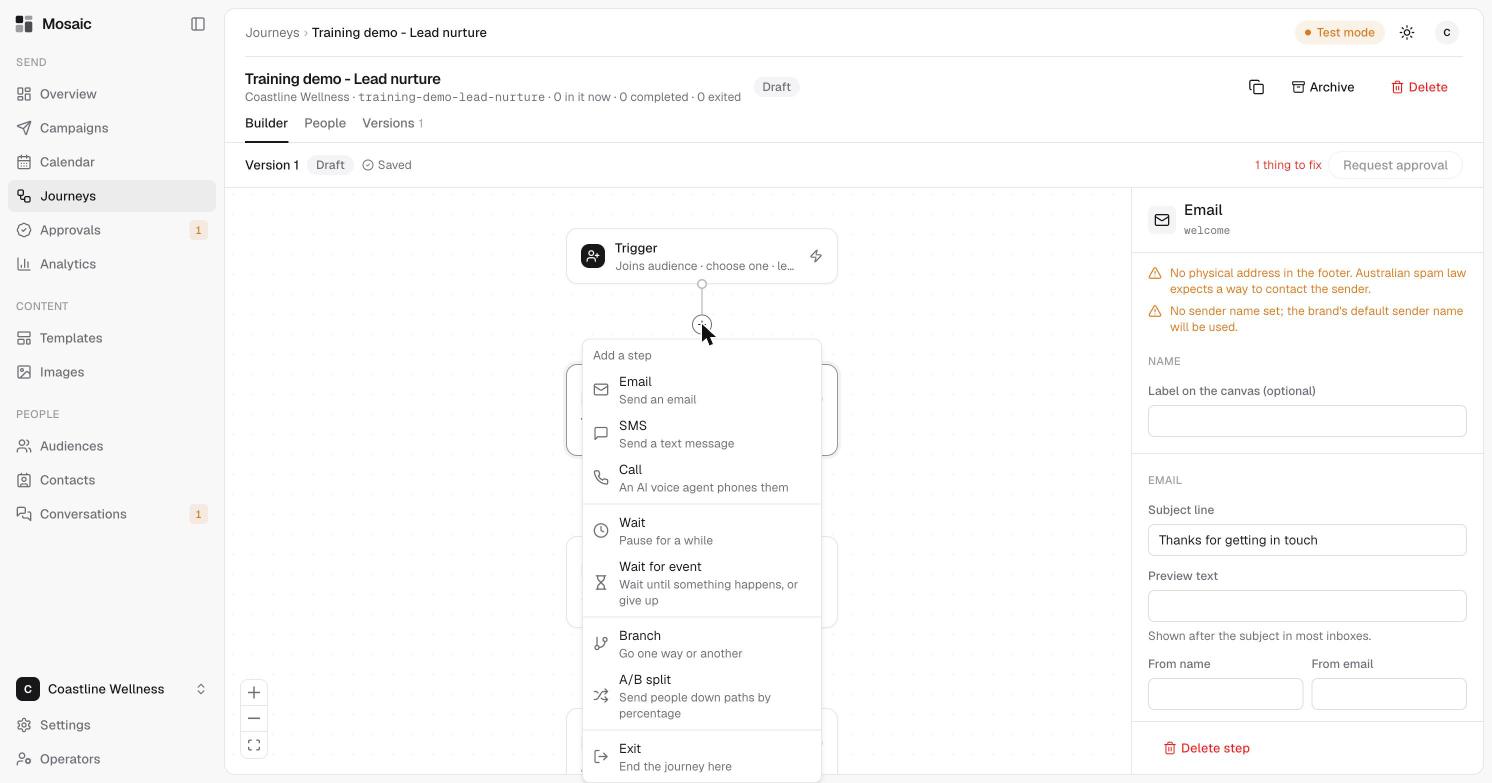
A journey is a column of steps on a canvas. Each step runs in order for each person.
The builder
- The canvas in the middle shows the journey from the Trigger at the top downwards.
- The panel on the right changes with what you've selected. With nothing selected it says Build the journey and lists Checks.
- Use the zoom controls at the bottom left to zoom in and out, or to fit the whole journey on screen.
- The header shows the journey's status, for example Draft, and Saved once your changes are stored. Changes save as you go.
Add a step
Click the + on any line between two steps. A menu offers:
| Step | What it does |
|---|---|
| Sends an email. | |
| SMS | Sends a text message. |
| Call | An AI voice agent phones them. |
| Wait | Pauses for a while. |
| Wait for event | Waits until something happens, or gives up. |
| Branch | Sends people one way or another. |
| A/B split | Sends people down paths by percentage. |
| Exit | Ends the journey here. |
Edit a step
Click a step to edit it in the panel on the right.
You can set a label on the canvas, the subject line, preview text (shown after the subject in most inboxes), and a from name and from email. If you leave the sender blank, the brand's default sender is used. See set up your sender.
Wait
Choose how long to wait, for example 2 days. You can also choose a time of day under Then wait until. That time is in the brand's time zone. Leave it empty to carry on straight away.
Delete a step
Select the step and click Delete step at the bottom of the panel.
Checks
The Checks list shows what needs attention before you can ask for approval.
- Red items must be fixed. For example, you must choose what starts the journey.
- Amber items are warnings. For example, an email footer with no physical address, or no sender name set. Australian spam law expects a way to contact the sender.
- For texts, Mosaic tells you how many parts a message is. A text using special characters, such as "…", counts 70 characters a part instead of 160, and each part is charged as a text.
The header tells you how many things there are to fix, and Request approval is available when there are none.
Next
Last updated 5 November 2026