Choose who joins and who leaves a journey
Set what starts the journey, the events that end it and the daily caps.
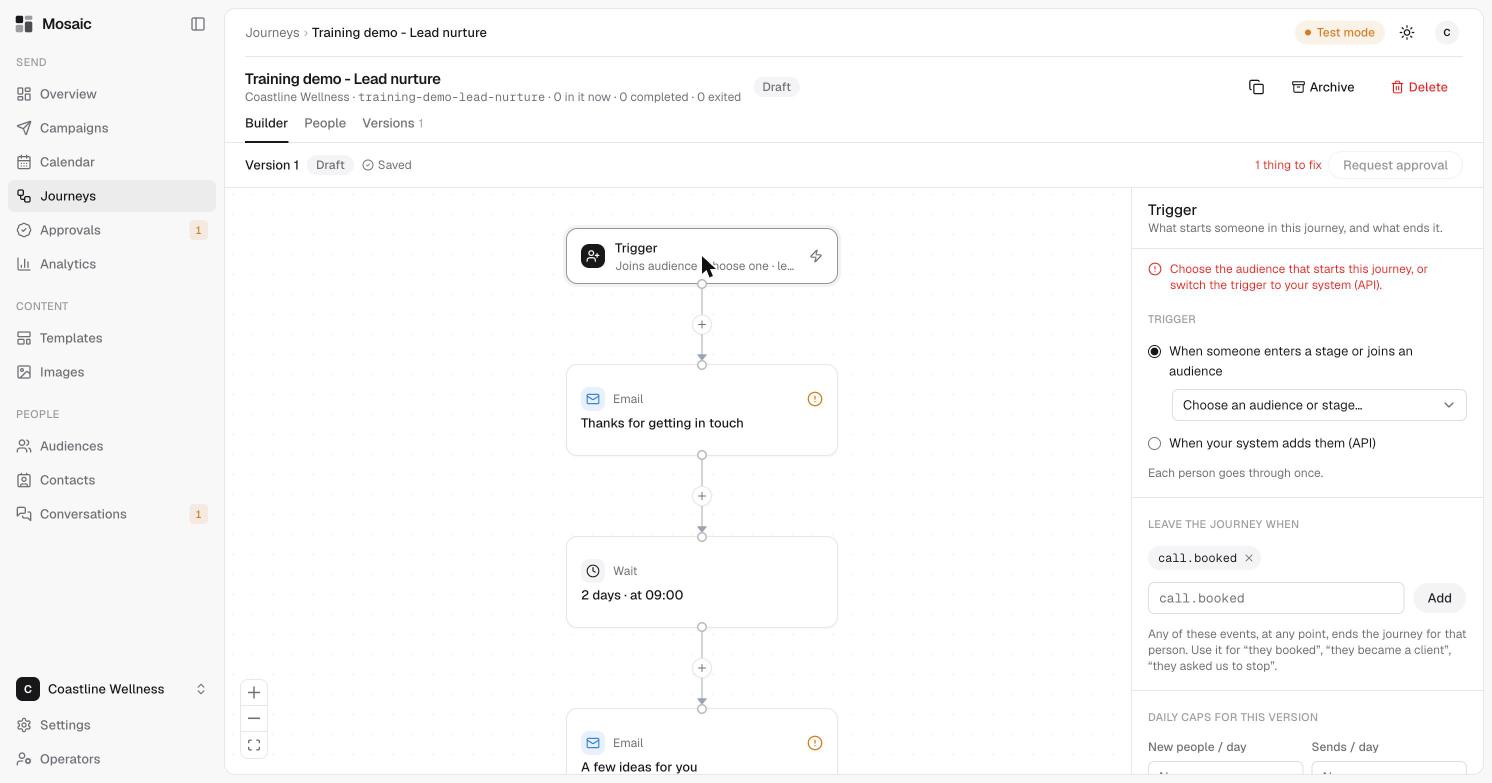
Click the Trigger at the top of the canvas to choose what starts someone in the journey, and what ends it.
What starts the journey
Choose one of two options.
- When someone enters a stage or joins an audience. Choose an audience or stage. New people who join it start the journey automatically. See create an audience.
- When your system adds them (API). Your CRM or app enrols people by the journey's slug. See integrations.
Each person goes through once.
You have to choose one before the journey can be approved. Until then, the Checks list shows "Choose the audience that starts this journey, or switch the trigger to your system (API)."
When someone leaves
Under Leave the journey when, add the events that end the journey for a person. Any of them, at any point, ends the journey. Use it for "they booked", "they became a client" or "they asked us to stop".
Events look like call.booked. Type one and click Add, or click the × beside one to remove it. The Lead nurture starting point already stops on call.booked.
Daily caps
Scroll down in the Trigger panel to Daily caps for this version:
- New people per day, how many can join in a day.
- Sends per day, how many messages the journey can send in a day.
Caps work alongside your account's safety limits.
Related
Last updated 5 November 2026