 Mosaic Help Centre
A tour of Mosaic
Find your way around the sidebar, the top bar and the Overview page.
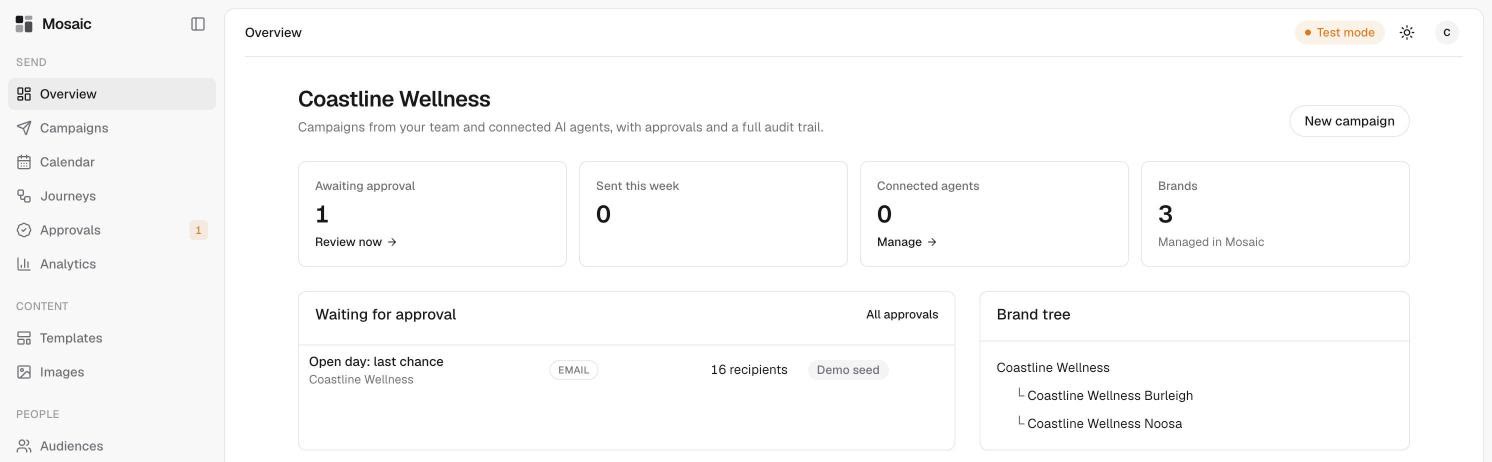
Everything in Mosaic is reached from the sidebar on the left. It has three groups.
Send
- Overview is your home page. It shows how many campaigns are waiting for approval, what was sent this week, your connected agents and brands.
- Campaigns is where you draft emails and texts. See campaign statuses.
- Calendar shows scheduled and sent campaigns. See plan a campaign on the calendar.
- Journeys holds automated follow-up sequences. See what journeys are.
- Approvals is where a person reviews and approves anything that's waiting to go out. A number beside it shows how many are waiting. See review and approve a campaign.
- Analytics shows what went out and what people did with it. See read your analytics.
Content
- Templates are reusable email and text designs. See templates.
- Images is your picture library. See the image library.
People
- Audiences are saved groups of contacts. See create an audience.
- Contacts is everyone you can message, with their consent record. See find contacts.
- Conversations is where replies to your texts arrive. A number beside it shows how many are unread. See reply to texts.
The bottom of the sidebar
Your current account is shown at the bottom left. Settings is below it.
The top bar
If you see Test mode at the top right, nothing is really sent. Test sends and approvals are recorded in Mosaic only. The sun icon switches between light and dark mode.
On the Overview page
- Waiting for approval lists campaigns that need a decision, with a link to the full Approvals page.
- Brand tree shows your brands and the brands under them. See brands.
- Recent campaigns shows the latest drafts and sends.
- Activity is a log of the latest actions in your account.